• Mossion M1 Laptop Stand

    Introduction

    The Mossion M1 Laptop Stand is an all-in-one desktop accessory that raises and tilts a laptop to improve ergonomics while integrating cooling, audio, and connectivity features.

    Design

    The M1 features a brushed aluminum chassis with a compact footprint and a clean, modern aesthetic that complements premium laptops.

    The stand includes rubberized contact points and a stable rotating base that protect devices and allow smooth swiveling for shared viewing.

    Cooling System

    An internal high-speed fan moves air beneath the laptop to lower surface temperatures and help prevent thermal throttling during intensive tasks.

    Fan operation offers multiple speed modes so users can balance cooling effectiveness and acoustic levels according to their environment.

    Audio System

    Integrated stereo speakers and passive radiators deliver fuller sound than typical laptop speakers and improve clarity for calls and media playback.

    Bluetooth connectivity lets the stand act as a desktop speaker for phones or tablets when the laptop is not in use.

    Connectivity Hub

    A built-in hub provides a mix of USB-A and USB-C ports for peripherals, charging, and data transfer to reduce cable clutter and centralize connections.

    Ports are positioned behind the laptop for easy access while maintaining a tidy desk layout.

    Ergonomics

    By elevating the screen and creating a gentle tilt, the M1 encourages a more neutral neck angle and supports pairing with an external keyboard and mouse.

    The fixed tilt angle favors typing comfort and a consistent viewing plane for extended work sessions.

    Usability

    Setup is straightforward with plug-and-play functionality for the fan, hub, and Bluetooth speaker components for most modern operating systems.

    The rotating base simplifies presentations and collaborative tasks by allowing the laptop to turn without relocating the entire stand.

    Performance in High Load

    During prolonged workloads or gaming sessions, the stand’s active cooling helps sustain higher performance by reducing thermal limits on the laptop.

    Surface temperatures around the device remain more comfortable for wrist and palm contact compared with use on a flat desk.


    Portability

    The M1 is built for desktop use but its compact, sturdy construction enables transport between workstations when needed.

    It is heavier and less collapsible than travel-oriented stands, making it better suited for semi-permanent setups.

    Cable Management

    Integrated channels and a rear hub keep cables routed cleanly out of sight while preserving easy access to frequently used ports.

    This design reduces desktop clutter and simplifies transitions between devices.

    Compatibility

    The stand accommodates a wide range of laptop sizes and designs while avoiding obstruction of vents and common port layouts.

    Compatibility with external monitors, keyboards, and mice is seamless, fitting into multi-device workflows.

    Ideal Users

    The M1 is aimed at remote workers, content creators, students, and professionals who need improved cooling, audio, and additional ports in a single unit.

    It is particularly useful for those who run heavy software or multitask across many connected peripherals.

    Limitations

    Active cooling introduces background noise that could be noticeable in very quiet environments, and users should evaluate noise tolerance.

    The integrated hub may not replace specialized docking stations for users who need advanced power delivery or multiple high-bandwidth ports.

    Aesthetic and Build Quality

    Premium materials and a minimalist profile help the M1 blend into modern workspaces while providing a durable, stable platform for daily use.

    Finishes and build tolerances are designed to align visually with higher-end laptops and desktop accessories.

    The Mossion M1 Laptop Stand consolidates elevation, cooling, audio, and connectivity into a single refined device that streamlines a desktop and addresses common laptop limitations.

    Continue..
  • LG PuriCare AeroCat Tower Air Purifier Overview

    Introduction

    The LG PuriCare AeroCat Tower Air Purifier is a hybrid home appliance that combines air purification with a cat-friendly resting space, designed to address indoor air quality and pet comfort in a single unit.

    This device targets households with cats by integrating filtration technology, pet-centric features, and a vertical, space-saving design to fit modern living spaces.

    Design and Concept

    The AeroCat Tower presents a tall, slim silhouette that resembles a stylish piece of furniture rather than a traditional air purifier, helping it blend into living rooms and bedrooms.

    Its top section functions as a heated dome seat for cats, offering a cozy elevated perch that encourages use while keeping the animal close to the purified air source below.

    The body houses a multi-stage filtration system engineered to capture pet dander, dust, pollen, and fine particles, with attention paid to airflow paths that maximize intake and clean-air output.

    Materials and finishes favor neutral tones and smooth lines to ensure aesthetic integration with a variety of interior styles, turning the appliance into a deliberate design element.

    Air Cleaning Performance

    The purifier uses a combination of pre-filter, HEPA-grade filtration, and activated carbon layers to remove particulates and odors commonly associated with pets.

    Smart sensors monitor real-time air quality and automatically adjust fan speed and purification intensity to maintain optimal indoor air conditions without constant user intervention.

    Noise levels are tuned to remain low during typical operation so the unit does not disturb resting cats or people, while offering higher-power modes for rapid cleaning after cooking or heavy activity.

    Energy-efficient fans and a design that optimizes airflow contribute to steady performance with reasonable power consumption for continuous use.

    Pet Features and Monitoring

    The heated dome provides selectable warmth settings to suit different feline preferences and seasonal needs, making the perch inviting throughout the year.

    An integrated weight-sensing platform tracks a cat’s presence and weight trends, enabling owners to monitor resting habits and receive helpful insights about potential changes in their pet’s behavior.

    The structure emphasizes safety and stability, featuring non-slip surfaces, rounded edges, and a balanced center of gravity to minimize tipping risk as cats jump on and off.

    Maintenance of the pet area is straightforward, with removable cushions and easily cleaned surfaces that resist hair accumulation and odors.

    Smart Connectivity and Controls

    The AeroCat Tower connects to a companion app for remote monitoring of air quality and pet data, enabling owners to check status and change settings from a smartphone.

    Push notifications can alert users to filter replacement needs, significant air-quality events, or notable changes in a cat’s weight or usage patterns.

    Physical controls on the unit provide quick access to basic functions while the app offers deeper customization, scheduling, and historical data review.

    Maintenance and Practical Considerations

    Filter replacement cycles are predictable and designed for user-friendly access, with clear indicators that remind owners when service is required.

    Regular cleaning of the pre-filter and the pet perch prolongs filter life and preserves performance, and LG supplies guidance for simple upkeep routines.

    Replacement filters and accessories are available through retail and service channels, and the unit’s modular design simplifies part swaps without professional assistance.

    Warranty coverage and customer support resources ensure owners have recourse for technical questions or repairs during the product’s service period.

    Safety and Environmental Notes

    The AeroCat Tower incorporates safety interlocks and stable construction to reduce hazards in multi-pet or active households.

    Energy-saving modes and responsible material choices reflect an environmental awareness consistent with modern appliance design, focusing on efficiency and recyclable components.

    The heated perch is thermostatically controlled to provide steady, safe warmth without overheating, and electronic safeguards prevent undue power draw when the seat is unoccupied.

    Conclusion

    The LG PuriCare AeroCat Tower Air Purifier merges targeted air-cleaning capability with pet-focused comforts and smart features, delivering a practical solution for cat owners concerned about air quality and pet wellbeing.

    Continue..
  • Overview: ilo robot Educational Robot Kit

    Overview

    ilo is an educational robot kit designed to introduce learners to robotics, programming, and hands-on engineering through a modular, buildable platform.
    The kit targets progressive learning, letting beginners start with visual block programming and advance to text-based languages as skills develop.
    ilo emphasizes accessibility and scalability so instructors can adapt challenges for different ages and skill levels.

    Hardware Design

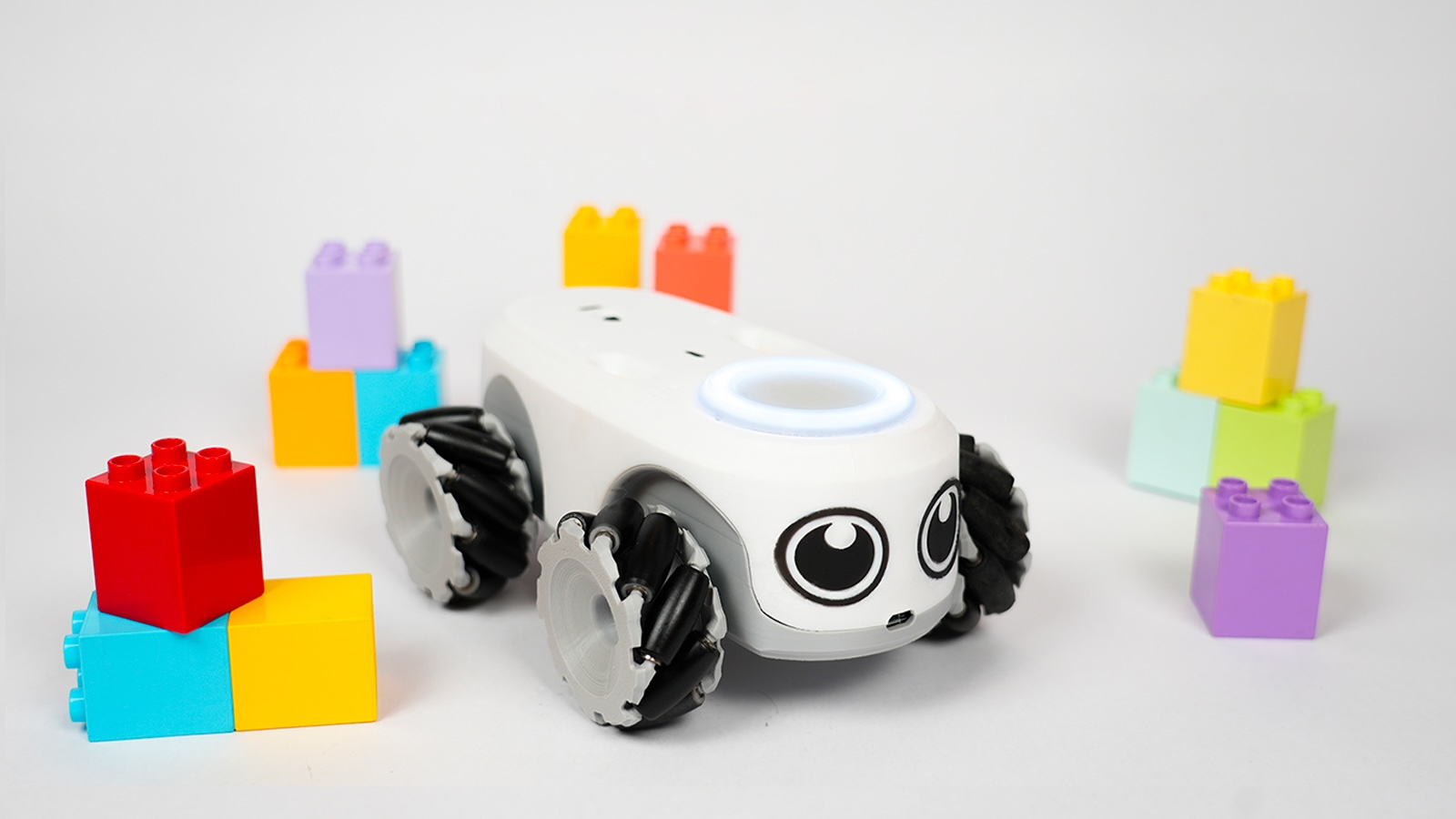
    The robot uses mecanum-style wheels for omnidirectional movement, enabling smooth demonstrations of kinematics and precise navigation tasks.
    Its chassis and modular mounting system allow quick attachment of accessories such as robotic arms, pen holders, and sensor packs.
    A top-facing PCB port and magnetic connectors make adding or swapping sensors straightforward, reducing assembly friction during lessons.

    Sensors and Expandability

    ilo supports a range of sensors including distance, sound, and temperature modules for diverse experiments.
    3D-printable accessories and open-ended assembly options encourage students to design and incorporate custom physical add-ons.
    The modular approach promotes iterative engineering: students test, troubleshoot, and improve both hardware and mounting solutions.

    Software and Connectivity

    The platform supports both block-based visual programming and Python to accommodate beginners and more advanced learners.
    Multiple connectivity options such as WiFi, Bluetooth, and USB enable flexible classroom setups and remote code deployment.
    Teachers can demonstrate code live, then let students wirelessly test variations on their own robots for hands-on exploration.

    Curriculum and Resources

    Educational bundles typically include guided projects, lesson plans, and sample code that align with common STEM objectives.
    Exercises often focus on algorithmic thinking, basic electronics, and mathematics through navigation and sensor-based activities.
    Resources are structured so learners move from highly guided tasks to independent projects, reinforcing cumulative skill growth.

    Classroom Integration

    ilo supports classroom management by enabling teachers to deploy and collect student code and telemetry for assessment.
    Group activities and collaborative challenges facilitate peer learning and build teamwork skills through shared design goals.
    The platform is suitable for makerspaces, after-school programs, and formal classroom environments.

    Learning Outcomes

    Building the kit reinforces mechanical reasoning, troubleshooting, and iterative design thinking as students assemble and debug modules.
    Programming exercises cultivate algorithmic thought, problem decomposition, and logical testing strategies.
    Sensor integration activities teach data interpretation and feedback control, linking software to physical behavior.

    Assessment and Differentiation

    Teachers can scale difficulty by changing code complexity, adding sensor constraints, or introducing timed challenges.
    Telemetry and logs help instructors evaluate understanding objectively and identify students who need targeted support.
    Differentiated pathways enable mixed-ability groups to work meaningfully on the same project with distinct roles.

    Creative and Cross-Disciplinary Projects

    ilo supports creative projects like drawing bots with pen holders and simple vision experiments using camera modules.
    Cross-disciplinary activities connect robotics with art, math, and science through design-driven challenges.
    Open-ended project prompts encourage original solutions and personal expression using technology.

    Maker Culture and Community

    The kit encourages maker values by providing templates and encouragement for custom builds and 3D-printed parts.
    Community sharing of designs and lesson ideas amplifies classroom resources and accelerates instructor onboarding.
    Students gain experience in collaborative creation, documentation, and iterative improvement.

    Technical Skills Progression

    Learners progress from drag-and-drop blocks to text-based programming, gaining fluency in syntax, functions, and control flow.
    Hardware labs teach basic electronics, connector logic, and power management in safe, structured exercises.
    Projects that combine sensors, movement, and logic develop integrated system thinking.

    Safety and Classroom Practicalities

    Physical components are designed for classroom durability with safe connectors and robust mounting points.
    Teachers should plan for storage, charging, and regular maintenance as part of classroom routines.
    Clear protocols for shared equipment and incremental testing reduce downtime and protect components.

    Teacher Support and Adoption

    Sample lesson plans and in-class activities shorten preparation time and provide clear learning objectives.
    Professional development or starter guides help teachers unfamiliar with robotics gain confidence quickly.
    A well-documented kit reduces barriers to adoption and encourages iterative improvement of local curricula.

    Assessment of Value

    ilo positions itself as a versatile educational tool that bridges tangible hardware and progressive software learning.
    Its modularity, curriculum resources, and maker-friendly design make it suitable for a wide range of educational settings.
    Educators benefit from a platform that supports measurable learning outcomes while offering room for creativity and extension.

    ilo fosters hands-on STEM learning by combining flexible hardware, dual-mode programming, and structured educational content.
    The kit builds technical skills, creativity, and collaborative problem solving through incremental challenges and open-ended projects.
    As a classroom and makerspace tool, ilo supports scalable instruction and meaningful student engagement in robotics.

    Continue..
  • Unistellar ENVISION Smart Binoculars

    Unistellar ENVISION Smart Binoculars

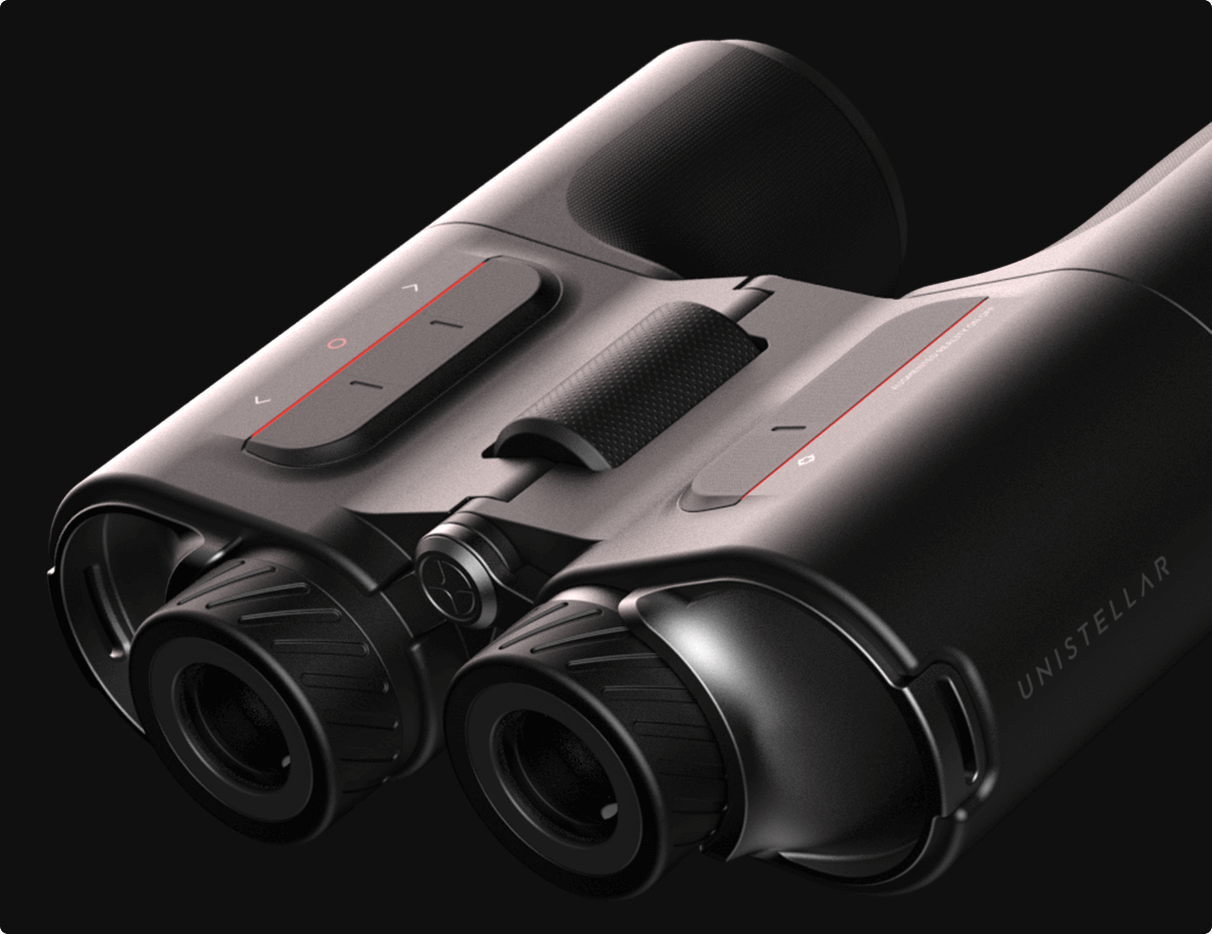
    The Unistellar ENVISION Smart Binoculars combine high-quality optical design with augmented reality overlays to create an intuitive, guided viewing experience for both astronomy and daytime exploration. The device aims to make target acquisition and identification simple for beginners while offering enhanced contextual data for experienced observers. Its core concept is to bring digital assistance directly into the eyepiece without replacing the tactile satisfaction of traditional optics.

    ENVISION’s augmented reality system projects labels, trajectories, and contextual highlights into the user’s field of view, making it easy to identify stars, planets, constellations, landmarks, and points of interest. The overlays adapt to the viewer’s orientation and zoom level so information appears relevant and unobtrusive. This real-time identification reduces the learning curve for new users and speeds up target confirmation for veterans.

    Optical performance is rooted in quality glass, multi-coatings, and a design optimized for bright, contrast-rich images both at night and during the day. The binocular form factor provides a natural, comfortable way to observe, with attention to eye relief and interpupillary adjustment for extended sessions. Image clarity and color fidelity are prioritized to ensure AR labels complement rather than obscure the natural scene.

    The binoculars pair with a companion app that handles device setup, software updates, and mission planning, while the core AR and stabilization run on the binoculars themselves. The app can save observation logs, sync targets, and provide curated guides for seasonal viewing or regional highlights. Connectivity is designed to be seamless, allowing users to focus on the view rather than technical configuration.

    ENVISION includes automated alignment routines that use onboard sensors to register the instrument to the sky or landscape quickly and accurately. These routines minimize manual calibration, letting users start observing in minutes instead of wrestling with star charts or compass bearings. The alignment preserves accuracy across multiple sessions and locations, streamlining repeat observations.

    For astronomical use, software-assisted enhancements such as dynamic contrast adjustment and multi-frame stacking help reveal fainter stars and subtle details without exposing the user to long photographic workflows. The binoculars do not replace dedicated astrophotography gear but offer a meaningful boost to visual detection limits. This approach helps casual observers and educators show more of the night sky in real time.

    Daytime modes include guided navigation overlays, distance estimates to visible landmarks, and wildlife spotting assistance that highlights likely points of interest. These features make the binoculars useful for hikers, birders, and landscape enthusiasts who want real-time contextual cues. The device is positioned as a hybrid tool for a broad range of outdoor activities.

    Ergonomics and build quality were considered to support handheld use over extended periods, with balanced weight distribution and a comfortable central focus mechanism. Controls are simplified so common adjustments can be made without removing the binoculars from the eyes. Durability and weather resistance are designed to withstand field conditions typical for outdoor observation.

    Power management balances the demands of augmented reality processing with the need for practical field endurance, offering multi-hour operation under moderate use. The unit supports energy-saving modes that reduce display overlays or dim electronics to extend runtime when necessary. Charging solutions focus on portability, with the option for external battery packs for prolonged outings.

    Unistellar emphasizes shared observing experiences by allowing users to save annotated targets and share them with a community through the companion app. Saved observations can include notes, target coordinates, and recommended viewing parameters. This social layer supports clubs, educational programs, and casual groups who want to collaborate on observations.

    The user interface inside the eyepiece is designed to be minimal and context-aware, surfacing only the most relevant information and prioritizing unobstructed viewing. Customization options let users choose which overlays they want active, such as labels, guiding arrows, or distance markers. These controls let experts tailor the device to their observing style while keeping it approachable for newcomers.

    ENVISION’s value proposition centers on lowering the barrier to meaningful observation by blending guidance with strong optical fundamentals, so users spend more time seeing and less time learning technical setup. The product targets people who want immediate engagement with the sky or landscape without sacrificing image quality. It also appeals to educators and outreach programs seeking accessible tools to inspire curiosity.

    Software updates and content expansions are integral to the platform, enabling new modes, expanded catalogs, and improved detection algorithms over time. The binoculars are positioned as an evolving product that can gain features and refinements post-purchase. This software-forward model keeps the user experience fresh and responsive to community feedback.

    Overall, the Unistellar ENVISION Smart Binoculars present a modern interpretation of binoculars that leverages augmented reality to enhance natural observation, bridge the gap between novice and expert, and create shared, educative experiences in both night sky and terrestrial contexts. The design philosophy stresses clarity, simplicity, and the complementary relationship between optics and software to open observation to a wider audience.

    Continue..
  • The Most Futuristic Gadgets of 2025!

    The Most Futuristic Gadgets of 2025

    2025 pushed consumer tech from iterative improvements into genuinely futuristic territory, blending generative AI, advanced robotics, quantum-ready computing, and sustainability-first design into everyday gadgets. The devices below represent the most striking leaps this year, showing how imagination and engineering are converging to reshape daily life Gadget Review.


    AI-Enhanced Smart Glasses with Real-Time Context

    The latest smart glasses act as a live, personal overlay for your world, delivering real-time translation, facial-context prompts, and contextual information layered onto what you see. These devices pair on-device generative AI with low-latency networks to offer instant assistance for travel, meetings, and hands-free workflows, making augmented reality genuinely useful beyond niche apps Gadget Review.

    Household Humanoid Robot Figure 03

    Figure 03 is a commercially notable domestic humanoid robot designed to perform chores, cook simple meals, and interact conversationally while adapting to household routines. It marks a step toward robots that are safe and useful in ordinary homes rather than confined to industrial settings TIME.

    Palm-Sized Autonomous Camera Drones

    Personal follow-cam drones such as cinematic micro-drones have become mainstream in 2025, autonomously tracking subjects, composing shots, and avoiding obstacles without manual controls. These gadgets target creators and active users who want high-quality footage without a camera crew TIME.

    At-Home Texture and UV Printing Tools

    Compact texture and UV printers designed for home use let makers print durable finishes and tactile designs directly onto everyday objects. These devices democratize customization and small-batch manufacturing, enabling creators to prototype and personalize products from home TIME.

    Quantum-Ready Consumer Laptops

    Early consumer machines with quantum co-processors or quantum-accelerated modules appeared in 2025 for specific workloads like cryptography research, advanced simulations, and data analytics. While not replacing classical CPUs for general tasks, these laptops offer acceleration for niche professional applications and signal broader commercialization of quantum technologies SlashGear.

    Mood-Sensing Wearables with Active Interventions

    Wearables advanced from passive tracking to active well-being assistants in 2025: rings and wristbands now combine multimodal biometrics and AI to detect stress and mood shifts, prompting breathing exercises, adaptive audio, or contextual suggestions to help users regulate in real time TechRadar.

    Sustainable and Repairable Smart Devices

    A major trend in 2025 is devices designed with circularity in mind: solar-assisted peripherals, biodegradable housings, and modular components for repairability. These products reduce environmental impact while maintaining high-tech features such as embedded NFC and smart power management Gadget Review.


    Why These Gadgets Matter?

    These gadgets are significant because they move beyond novelty into everyday utility: AI and robotics are finally addressing routine tasks; personal drones and AR are lowering the barrier to creative expression; and quantum and sustainable designs point to next-stage infrastructure for professionals and consumers alike Gadget Review TIME SlashGear.

    2025 shows that the future is less about a single breakthrough and more about intelligent composition: AI, robotics, connectivity, and sustainability combined to produce gadgets that feel like the opening chapters of a different era in consumer tech

    Continue..
  • What to look for when choosing a 2026 gaming laptop

    Introduction

    2025’s gaming laptops pack desktop-level power into portable chassis, balancing raw performance, efficient cooling, and smarter power management. This guide highlights the key choices and practical advice to help gamers pick the best laptop for their needs, whether prioritizing frame rates, portability, battery life, or value.

    What to look for when choosing a 2025 gaming laptop

    • GPU performance: Dedicated mobile GPUs determine gaming fidelity and frame rates; prioritize higher-tier GPUs for ray tracing and high-refresh gameplay.
    • CPU and cores: Multicore processors improve gaming performance and multitasking; faster single-core speeds still benefit many games.
    • Display: Choose a high-refresh panel (144 Hz or higher) for competitive play, and consider resolution based on GPU strength: 1080p for top frame rates, 1440p for visual fidelity, 4K only if your GPU can handle it.
    • Cooling and thermals: Effective thermal design sustains boost clocks under load and reduces throttling; robust vapor chambers, multiple heat pipes, and high-flow fans matter.
    • Build and portability: Thin-and-light models trade some thermals for mobility, while bulkier chassis usually permit better performance and quieter fans.
    • Battery life and charging: Gaming drains batteries quickly; look for fast-charging and consider hybrid modes that extend battery life for non-gaming use.
    • Keyboard and I/O: Responsive key travel, per-key or zone RGB, and a full complement of ports (USB-C with high-bandwidth, HDMI, Ethernet) improve both play and streaming workflows.
    • Value and warranty: Factor total cost of ownership, upgradeability, and warranty support when comparing models.

    Best categories and who they suit

    • Best overall performance: For gamers who want desktop-class power in a laptop form factor; ideal for high-resolution, high-refresh gaming and creative workloads.
    • Best for competitive esports: Lightweight, high-refresh displays and low-latency components favor players who prioritize consistent high FPS over absolute visual fidelity.
    • Best portable option: Thin, well-built models that balance reasonable gaming performance with all-day mobility for students and traveling creators.
    • Best budget pick: Offers the best price-to-performance tradeoff, focusing on solid 1080p gaming and upgrade paths rather than premium materials.
    • Best for creators and streamers: Powerful CPUs and GPUs with robust thermals, high-quality webcams/mics, and ample memory and storage for content production.

    How to choose the right spec for your budget

    1. Entry-level budget: Aim for a capable midrange GPU, 16 GB RAM, and a 1080p 144 Hz display to maximize value.
    2. Mid-range: Target a stronger mobile GPU, 32 GB RAM if you multitask, and a 1440p high-refresh display for sharper visuals.
    3. High-end: Pair top-tier mobile GPUs with high-core-count CPUs, 32–64 GB RAM, and fast NVMe storage for longevity and top performance.

    Setup and optimization tips after purchase

    • Update GPU and chipset drivers immediately and enable the laptop’s performance profile for gaming sessions.
    • Calibrate display settings and use in-game presets matched to your resolution and refresh rate goals.
    • Use manufacturer utilities to tune fans and power limits only if you’re comfortable; undervolting and custom fan curves can reduce thermals and noise.
    • Keep storage organized and install frequently played titles on the fastest NVMe drive for reduced load times.
    • Regularly clean vents and fans to maintain airflow and thermal performance.


    Decide first what matters most: raw frame rates, portability, or price. Choose a display that matches your GPU capability, prioritize cooling to preserve performance, and invest in sufficient RAM and fast storage. For most buyers in 2025, a balanced mid-to-high-range configuration delivers the best mix of longevity and gaming experience.

    Continue..
  • Garmin Venu 3 vs Vivoactive 5 — head-to-head comparison

    Garmin Venu 3 vs Vivoactive 5 — head-to-head comparison

    The Garmin Venu 3 and Vivoactive 5 target similar users but take different approaches: the Venu 3 emphasizes a premium display, extra sensors and on-watch call/voice features, while the Vivoactive 5 focuses on a lighter, more affordable daily-fitness experience Wareable Android Authority.


    Model Display Battery (typical watch mode) Key sensors On-device calls / voice
    Venu 3 1.4″ larger AMOLED Longer battery life (multi-day) GPS, barometric altimeter, ECG support, advanced HR Yes; phone calls and voice assistant support
    Vivoactive 5 1.2″ AMOLED slightly smaller Strong multi-day battery, slightly lower than Venu 3 GPS, optical HR (no barometer on some configs) No on-device calls or voice assistant

    Sources: Versus Wareable Android Authority.


    Design and display

    The Venu 3 offers a larger, sharper AMOLED screen and a slightly bigger case aimed at users who prioritize a premium visual experience during workouts and everyday wear Versus Wareable. The Vivoactive 5 is thinner, lighter and designed for comfort and all-day wear at a lower price point Versus manolo-running-coach.com.


    Fitness tracking and sensors

    Both watches provide robust GPS-based activity tracking, running metrics and sleep coaching features, but the Venu 3 adds extra hardware such as a barometric altimeter and additional health sensors that support features like ECG and more precise elevation tracking Versus Wareable. The Vivoactive 5 delivers the core Garmin fitness toolkit with excellent day-to-day metrics while omitting some of the Venu 3’s higher-end sensor extras to keep size and cost down Android Authority vo2-optimum-training.com.


    Battery life and daily use

    Both models achieve multi-day battery life suitable for regular use. The Venu 3 generally offers longer runtime in typical watch mode, trading a slightly larger case and weight for that extended endurance Versus Wareable. The Vivoactive 5 maintains competitive battery performance while being slimmer and lighter for users who value minimal wrist bulk Versus manolo-running-coach.com.


    Software, connectivity and smart features

    The Venu 3 includes on-device phone call capability and voice assistant support for hands-free interactions, placing it a step above the Vivoactive 5 in smart features Wareable Android Authority. Both watches run Garmin’s current software with sleep coaching, automatic nap detection and firmware updates, and both support the Garmin Connect ecosystem and companion app customization Wareable Android Authority.


    Who should buy which

    • Choose the Venu 3 if you want a larger AMOLED display, advanced sensors (barometer, ECG-capable hardware), on-watch calling and voice assistant, and longer battery life in exchange for a slightly larger, heavier watch and higher price Versus Wareable Android Authority.
    • Choose the Vivoactive 5 if you prioritize a lighter, slimmer watch with strong fitness tracking, excellent daily battery life and better value for money while accepting fewer premium sensors and no on-device call/voice features manolo-running-coach.com Android Authority vo2-optimum-training.com.


    If budget allows and you want the most complete set of health sensors plus on-watch smart features, the Venu 3 is the stronger all-around pick Wareable Android Authority. If you want Garmin reliability, core fitness features and a lighter, more affordable wearable for everyday training, the Vivoactive 5 represents better value manolo-running-coach.com vo2-optimum-training.com.

    Continue..
  • Nothing Ear (3) True Wireless Earbuds

    Nothing Ear (3) True Wireless Earbuds

    The Nothing Ear (3) are Nothing’s third-generation flagship true wireless earbuds, redesigned with refined materials, upgraded audio hardware, and call-focused innovations aimed at creators and everyday users who demand clear voice capture and balanced sound Nothing (España) computerhoy.20minutos.es.


    Design and build

    Nothing keeps its signature transparent aesthetic while introducing metallic accents for increased sturdiness and a premium feel elperiodico.com. The earbuds and case follow a minimalist, recognizable silhouette with a focus on tactile controls and quick, intuitive handling. The charging case includes a dedicated hardware improvement that contributes to better voice capture during calls computerhoy.20minutos.es.


    Sound and performance

    The Ear (3) deliver a tuned sound profile that balances punchy mids with controlled bass and clear highs suitable for a wide range of genres and voice content. The earbuds support high-resolution audio pathways and propose improvements over previous generations in driver design and digital signal processing to achieve greater clarity and dynamic range Nothing (España).


    Microphone and call quality

    Nothing introduces a Super Mic system that elevates call quality by leveraging multiple microphones and a case-based capture source to reduce background noise and prioritize the speaker’s voice computerhoy.20minutos.es. This multi-microphone approach significantly improves intelligibility in noisy environments and aims to make the Ear (3) one of the strongest options in its class for voice calls and conferencing elperiodico.com.


    Active noise cancellation and modes

    The Ear (3) offer selectable active noise cancellation levels and an adaptive mode that balances environmental awareness with isolation. The ANC implementation targets real-world reduction of ambient noise across commuting, office, and urban environments while preserving natural vocal frequencies for comfortable conversation and media listening Nothing (España).


    Battery life and charging

    The earbuds provide competitive battery life for full-day use, with the charging case extending total runtime to cover extended listening sessions. Fast USB-C charging and efficient power management ensure the Ear (3) are ready for travel or long commutes with minimal downtime Nothing (España).


    Connectivity and features

    The Ear (3) include modern Bluetooth codecs and stable multi-device pairing routines for seamless switching between phone, tablet, and laptop. Companion app controls let users fine-tune EQ, toggle ANC modes, configure touch controls, and apply firmware updates that periodically refine performance and add features Nothing (España).


    Use cases and who should buy them

    • Frequent callers and remote workers who need reliable, high-quality voice capture will benefit from the Super Mic system and strong microphone array computerhoy.20minutos.es.
    • Music listeners seeking a neutral-yet-engaging tuning with enough detail for most genres will find balanced performance and an adaptable EQ via the app Nothing (España).
    • Commuters and urban users will appreciate the multi-level ANC and ambient modes that let them tune how much outside sound passes through Nothing (España).
    • Design-conscious buyers who want standout aesthetics without compromising functionality will value the transparent-and-metallic look elperiodico.com.

    Limitations and considerations

    • Accessory ecosystems and third-party mount options remain limited compared with longer-established audio brands, potentially affecting users who prioritize specialized fittings or custom accessories Fnac.
    • Audiophiles seeking extreme detail or replaceable components may prefer larger, over-ear or modular systems, as true wireless earbuds trade some ultimate fidelity for portability and convenience Nothing (España).

    Final verdict

    The Nothing Ear (3) bring meaningful upgrades in call technology, material finish, and tuning while preserving the brand’s distinctive design language. They represent a strong mid-to-high-tier proposition for users who prioritize voice clarity, everyday ANC performance, and a stylish, forward-looking aesthetic Nothing (España) computerhoy.20minutos.es elperiodico.com.

    Continue..
  • Covert Dock 3 and ShadowCast 3

    Covert Dock 3 and ShadowCast 3

    2025 introduced two highly anticipated accessories from Genki aimed at portable console and PC gamers: the Covert Dock 3, a compact HDMI dock with modern display features, and the ShadowCast 3, a next-generation capture/streaming device for on-the-go recording and passthrough capture Kickstarter.


    What they are

    • Covert Dock 3 is a travel-sized dock designed to provide full-featured HDMI output with modern gaming display standards such as HDMI 2.1 and variable refresh rate support, enabling higher-resolution and lower-latency output for emerging handheld consoles and gaming PCs The Verge.
    • ShadowCast 3 is the successor to Genki’s ShadowCast devices, positioned as a portable capture card that lets users connect consoles or handhelds to laptops, tablets, or streaming setups while preserving quality and mobility Nintendo Life Kickstarter.

    Key features and specifications

    • Display and performance: The Covert Dock 3 targets current display demands by including HDMI 2.1-level features and VRR, making it suitable for devices that output at higher frame rates or resolutions The Verge.
    • Capture quality: Early coverage and product positioning suggest ShadowCast 3 aims to improve on prior generation limits and is expected to offer higher capture fidelity, with plausible support for 4K capture at 60 fps where source hardware permits Nintendo Life Kickstarter.
    • Form factor and portability: Both products emphasize a compact, road-ready design for creators who need plug-and-play docking or capture without a bulky desktop setup Kickstarter.
    • Platform intents: Marketing and early teases directly reference compatibility with next-gen handhelds and portable gaming devices, including rumored or confirmed support targets like Switch 2 and similar ultraportable consoles Nintendo Life The Verge.

    Real-world use cases

    • Travel docking and multi-display: Covert Dock 3 serves content creators and professionals who need a small dock with modern display features to connect handheld consoles or laptops to TVs and monitors during travel or remote work The Verge.
    • On-the-go streaming and capture: ShadowCast 3 enables streamers and vloggers to capture console gameplay, record high-quality footage on laptops or tablets, and route video for live streaming without a full desktop capture rig Nintendo Life Kickstarter.
    • Hybrid workflows: Combined, the devices let a user switch between a tidy living-room docked setup and a mobile capture workflow that moves seamlessly between home, travel, and event environments Kickstarter.

    Strengths and potential limitations

    • Strengths: Modern display support and VRR in a portable dock; a capture card optimized for mobility; clear orientation toward next-gen handheld compatibility; strong Kickstarter/community-backed launch momentum The Verge Kickstarter.
    • Limitations: Finalized capabilities depend on firmware and host-device support, and initial teases leave some performance details unconfirmed until hands-on reviews and official specifications are published Nintendo Life todogamers.cl.
    • Ecosystem caveats: Full benefit requires compatible host hardware that outputs the intended resolutions and frame rates; platform manufacturers’ policies and firmware updates can affect compatibility and features The Verge.

    Verdict and who should care

    • Who should consider them: Mobile creators, portable-console owners, developers needing a compact test/docking solution, and streamers who value portability and modern HDMI features.
    • Why they matter: Covert Dock 3 and ShadowCast 3 represent a practical response to the growing demand for professional-quality, portable video I/O that keeps pace with next-generation handheld hardware and streaming workflows The Verge Kickstarter.


    Both products were introduced via Genki’s crowdfunding and teaser channels, with campaign and announcement materials detailing the product family and inviting early backers and press previews Kickstarter YouTube. Initial press coverage and hands-on impressions are emerging as units travel to reviewers and community testers Nintendo Life The Verge.

    Continue..
  • FellHerz

    Was macht FellHerz?

    FellHerz ist eine nachhaltige Modemarke, die 2006 in München gegründet wurde. Das Unternehmen entwirft und produziert bedruckte Kleidung und Accessoires aus zertifizierter Bio-Baumwolle, Fair Trade und veganen Verfahren. Der gesamte Druck erfolgt in Handarbeit in der Münchner Werkstatt, nachdem die Kleidungsstücke in Indien nach GOTS- und SA8000-Standards gefertigt wurden.

    Produktangebot auf der Website

    – Kurzarm-T-Shirts (Cap Sleeves), Langarm-T-Shirts und T-Shirt-Kleider
    – Sweatshirts und Hoodies mit kreativen Illustrationen
    – Leggings und Strumpfhosen aus umweltfreundlichen Stoffen
    – Taschen und Tragetaschen aus Bio-Baumwolle
    – Accessoires: Bambussocken und vegane Accessoires
    – Kinderbekleidung: Kinder-T-Shirts aus recycelter Baumwolle
    – Limitierte Editionen und Geschenkpakete (Bundles)

    Bestseller

    – Cap Sleeve T-Shirts mit Motiven wie „Swing Girl“, „Wood Girl“ und „Seagull Flight“ sind oft schnell ausverkauft, was ihre große Beliebtheit widerspiegelt.
    – Hoodies in Sondereditionen (z. B. „Möwen-Liebe“ und „Dandelion“)
    – Bundles mit drei Cap Sleeve T-Shirts in verschiedenen Farben
    – Dekorative T-Shirt-Taschen mit exklusiven Prints

    Vorteile gegenüber der Konkurrenz

    – Zertifizierte Materialien (GOTS-Baumwolle, recyceltes Polyester, Bambus) und vegane Produktionsgarantie Maximale Nachhaltigkeit und Rückverfolgbarkeit
    – Einzigartige Designs, handillustriert und im Siebdruckverfahren in München gedruckt
    – Kostenloser Versand innerhalb der EU und schnelle Lieferung (Bestellungen vor Mittag werden noch am selben Tag versendet)
    – Sehr reaktionsschneller Kundenservice mit persönlicher Betreuung und Antwort innerhalb weniger Stunden
    – Mitglied der FairCommerce-Initiative mit rechtlicher Transparenz und sozialem Engagement

    Was sagen Ihre Kunden?

    – „Ich besitze bereits sechs dieser T-Shirts – die Qualität ist hervorragend und der Schnitt ist sehr vorteilhaft. Der Service war extrem schnell und sehr freundlich.“
    – „Der Versand verlief reibungslos, die Verpackung spiegelt die Sorgfalt wider, die jeder Bestellung gewidmet wird. Das perfekte Geschenk für alle Liebhaber nachhaltiger Mode!“
    – „Nach mehreren Wäschen sind Farbe und Passform immer noch einwandfrei. Ein Basic, das ich das ganze Jahr über trage.“

    Wie sieht Ihre Website aus?

    Die Website von FellHerz besticht durch ein minimalistisches und responsives Design mit einem übersichtlichen Hauptmenü und Handlungsaufforderungen unter „Sale“, „Bundles“ und „Gutscheine“. Sie läuft über HTTPS, garantiert SSL-Verschlüsselung und lädt Bilder schnell. Obwohl das Einkaufserlebnis sehr flüssig ist, könnte es von einem Blog oder einem Stilbereich profitieren, um zusätzlichen organischen Verkehr anzuziehen und die Long-Tail-SEO zu verbessern.

    Continue..